Everything TripNoted does, from inbox to itinerary.
One connection to Gmail turns scattered confirmations into a living itinerary you can trust. Here’s every piece — how trips build themselves, how they stay current, and how you stay in control.

Automatic coverage
If it lands in your inbox, it lands in your trip.
TripNoted recognizes confirmations across the whole journey — not just flights and hotels.
Flights
Airlines & confirmations
Hotels & stays
Bookings & changes
Rides & transport
Trains, transfers, rideshare
Restaurants
OpenTable, Resy & more
Activities & tickets
Tours, attractions, events
Cruises & rail
Multi-leg journeys
Car rentals
Pickups & drop-offs
Multiple mailboxes
Personal + work travel
Features in depth
The whole product, one capability at a time.
From the moment you connect Gmail to the moment you share a finished itinerary — here's what each part does.
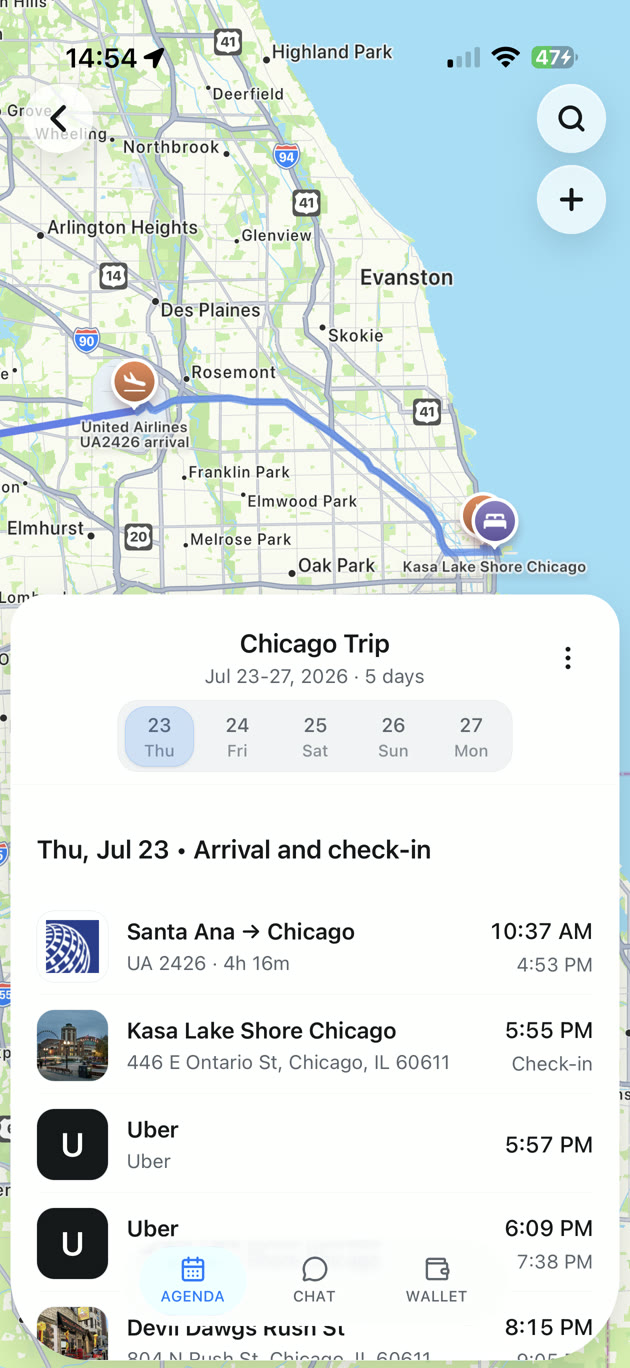
Trips build themselves from your inbox.
Connect Gmail once and TripNoted finds your flights, hotels, rides and reservations and groups them into trips — automatically, with no forwarding to a special address. Your last six months come in free on day one.
- Sign in with Google — no password stored
- No forwarding, no manual entry
- Your last six months imported free
Updates merge in. They don't pile up.
When an airline moves your flight or a hotel confirms a change, TripNoted replaces the stale detail instead of stacking another email on the pile. Your trip stays one clean, current timeline.
- Schedule changes update in place
- Duplicates and reminders merged automatically
- Connected calendars stay in sync
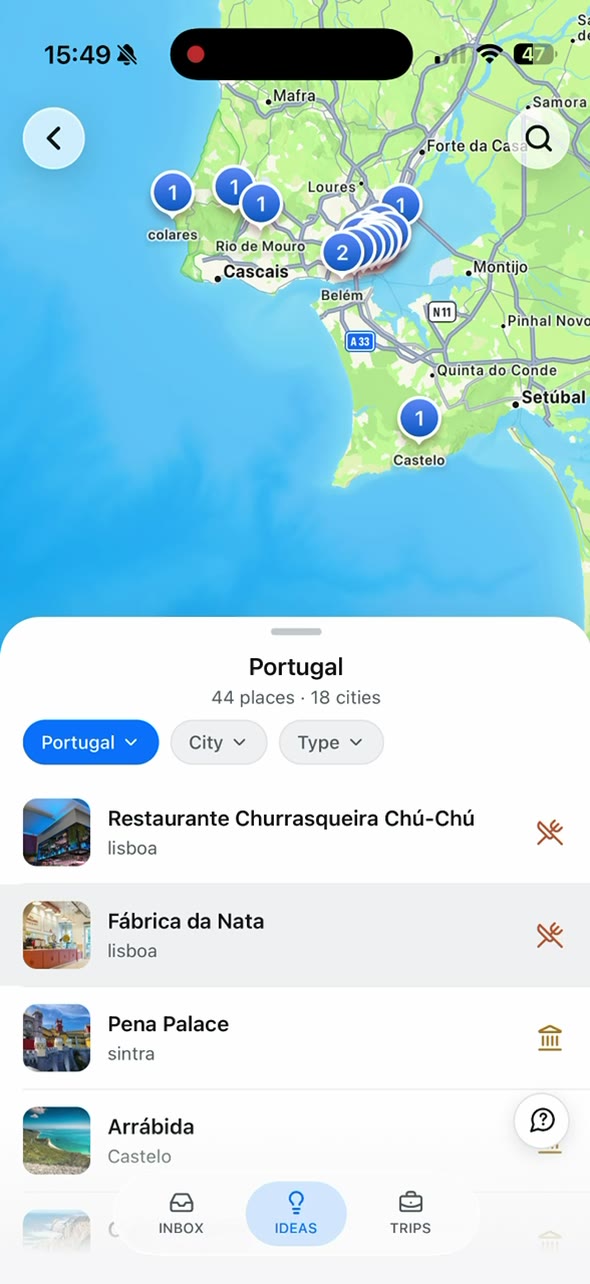
Past trips become context for the next one.
TripNoted remembers where you've been — the hotels you liked, the pace you travel, the places you keep returning to — and uses it to make the next trip easier. Go deeper with up to a decade of history on Plus.
- A complete travel history from day one
- Smarter answers grounded in real trips
- Up to 10 years of Gmail history on Plus
Grounded AI answers about your real bookings.
Ask about landing times, layovers, or what's reserved when, and get answers pulled straight from your confirmations — not invented. It asks before changing anything. Five questions per trip free, fifty on Plus.
- Answers grounded in your reservations
- Won't invent bookings you don't have
- Asks for approval before any change
Your trips, on the calendar you already use.
TripNoted keeps your itinerary in sync with your connected calendar, so flights and reservations show up alongside the rest of your day — and stay correct when plans shift.
- Flights and reservations on your calendar
- Updates flow through when times change
- Included on the free plan
Your itinerary works without a signal.
Landing in a new city with no data is exactly when you need your plans most. Your trip details stay available offline, so confirmation numbers and times are there when the connection isn't.
- Trip details available offline
- Confirmation numbers always at hand
- Included on the free plan
Share or print a clean itinerary in a tap.
Export a trip as a tidy PDF for the people traveling with you, or for the times you just want a printout. Share the plan without giving anyone access to your inbox.
- Export any trip as a clean PDF
- Share without sharing your inbox
- Trip collaboration coming soon on Plus
Personal and work travel, in one place.
Connect more than one Gmail account so bookings from every inbox land in the right trip. Free covers one mailbox; Plus connects two, and Family gives each member their own.
- Combine personal and work travel
- 1 mailbox free · 2 on Plus
- Each Family member keeps their own mailbox
The least access it needs, with obvious control.
Reading your inbox is a big ask, so TripNoted is built to take the minimum and hand you the controls. Sign in with Google, never share a password, and disconnect or delete anytime.
- Sign in with Google — OAuth only
- Never used to train generalized AI models
- Disconnect access or delete data anytime
Keep exploring
Go deeper on the parts that matter to you.
From planning an itinerary to seeing how TripNoted compares — here's where to look next.
Best travel organizer apps
How TripNoted stacks up against the field of travel organizers.
Explore
Travel itinerary planner
Turn booking emails into one living, always-current itinerary.
Explore
Ask your trip
Grounded AI answers about the trip you already booked.
Explore
Pricing
Free to start. Plus and Family add depth, history and sharing.
Explore
Compare alternatives
TripNoted vs TripIt, Wanderlog, Tripsy and Google Calendar.
Explore
FAQ
Questions about what TripNoted does.
The essentials before you connect Gmail.
TripNoted is a travel organizer app that reads the booking emails already in your Gmail and turns them into one living itinerary — flights, hotels, rides, restaurants, activities and more — that updates itself when plans change. No forwarding, no spreadsheets, no manual entry.
Flights, hotels and stays, rides and transport, restaurants (OpenTable, Resy and more), activities and tickets, cruises and rail, and car rentals. It also supports connecting multiple mailboxes so personal and work travel land in the right trips.
No. Unlike apps that make you forward each confirmation to a special address, TripNoted reads the booking emails already in your inbox after you connect Gmail. It's automatic from the first sign-in, including your last six months.
Yes. Free is $0 and includes one Gmail account, a six-month import, calendar sync, offline access, and five AI questions per trip. Plus is $5/mo or $49/yr for two mailboxes, a 10-year import and fifty AI questions per trip, with Family plans for shared travel.
An iOS app is coming soon. Today you connect and use TripNoted through the web app — start free by connecting your Gmail account.
See your trips organize themselves — free to start.
Connect Gmail and watch your booking emails become one living itinerary in minutes. Free forever for one mailbox — upgrade only when you want a decade of history.
No password stored · Disconnect anytime · iOS app coming soon