What Is a Flight Confirmation Number? Where to Find Yours
By TripNoted · Updated October 15, 2026
Your flight confirmation number is the short code used to find your booking. Look for confirmation code, booking reference, or record locator in your airline email. It is often six characters, and it is different from both your flight number and your e-ticket number. Keep it with your trip so it is easy to find when check-in opens.

Where to find your flight confirmation number
Start with the message you received after booking. The code is usually near the top of the email or next to the passenger and flight details.
- Search your email. Try the airline name, the booking site, your destination, or words such as confirmation, itinerary, and ticket.
- Check the right message. Open the booking confirmation or e-ticket receipt. A payment receipt can have a separate transaction or order number.
- Look for the label. Find confirmation code, booking reference, booking code, or record locator. Some travel documents call it a PNR code.
- Check your airline account. Open the app or website and look in My Trips or Your trips if the booking is linked to your account.
- Check your boarding pass. If you have already checked in, it may also show the booking code.
In Gmail, try in:anywhere (flight OR itinerary OR confirmation) and add the airline or booking-site name to narrow the results. The in:anywhere search includes Spam and Trash. If someone else made the booking, ask them to check the email address they used.
Airlines use different formats. For example, American Airlines describes its record locator as six letters. Do not reject a code just because it has no digits; “confirmation number” does not always mean a string of numbers.
Keep the booking with the rest of your trip in TripNoted Free
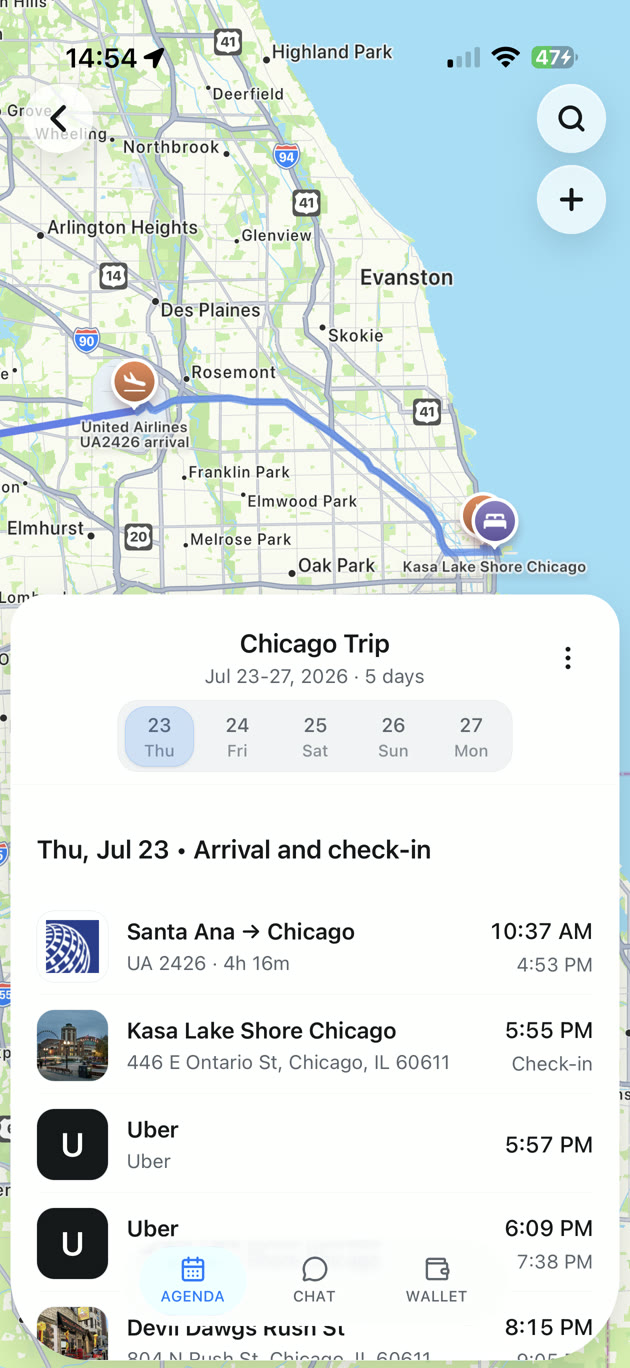
Finding one confirmation is easy enough. Finding the right flight, hotel, and transfer message while you are on the move takes more effort. TripNoted Free brings recognized booking emails into an organized trip, so your travel details stay together.
Connect Gmail to import recent bookings automatically, or create a trip and add plans yourself. Keep dates, times, locations, and notes in the itinerary. TripNoted updates recognized booking details as it imports new travel emails.
Free includes shared trip viewing and editing. On iPhone, downloaded trip details and supported edits work offline. Open your trip before you leave while you have a connection, then keep the useful details close when you travel.

You can also add your flight to Google Calendar or Apple Calendar to see it alongside the rest of your day.
Read a confirmation without mixing up the numbers
A booking message can contain several codes. The label beside each one matters more than its position in the email.
Illustrative booking details
- Booking reference
- DEMO42Use the airline’s booking code to retrieve the reservation.
- Flight number
- AB123Identifies a flight service; use it with the travel date to check flight status.
- Travel date
- October 24, 2026Match the date to your journey. A flight number can be used again on another day.
- E-ticket number
- 000 1234567890A separate ticket document number, often shown on the receipt.
A flight number is shared by the passengers on that service. Your booking reference identifies the reservation, which can include more than one traveler. A ticket number is separate again: American Airlines and Delta describe their ticket numbers as 13 digits.
You may also see the term PNR, short for Passenger Name Record. Travel sites often use “PNR code” for the reference used to retrieve that booking record.
If you booked through a travel site or agency
Look for the airline’s confirmation code as well as the seller’s order or itinerary number. They may be different. A long reference on a booking-site receipt is not necessarily the code the airline wants.
Open the seller’s booking details and look for a field labeled airline confirmation or airline booking reference. If it is missing, ask the seller for the airline code and the e-ticket receipt.
For a partner flight, check the operated by line in the confirmation. The airline selling the ticket can differ from the airline flying the plane. If a code does not work on the operating airline’s site, ask the seller or airline for the reference that carrier uses. Not every partner booking has different codes, so check rather than assume.
If your confirmation code does not work
- Check the code type. Use the airline booking reference, rather than the flight number, seller order number, or payment reference.
- Check the passenger name. Enter the surname as it appears on the reservation. Follow the airline’s form if it asks for more details.
- Check the airline. A partner carrier may use a different booking reference. Read the operated-by line.
- Open the latest message. A canceled or replaced reservation may still appear in an older email.
- Ask the airline or seller. Have the traveler’s name, travel date, route, and flight number ready. Ask them to confirm the booking and ticket status.
A reservation code alone does not always mean that a ticket has been issued. For example, an airline can allow a booking to be held before payment. If you are unsure, look for the e-ticket receipt or ask the airline or seller to confirm that the ticket was issued.
Use the code on the airline’s official site
Airlines commonly ask for the booking code and passenger name to open a trip. Their forms can ask for other details too. Start from the airline app or type its official website address yourself, then choose My Trips, Manage booking, or Check in.
You can use the retrieved booking to check its details and follow the airline’s available check-in or change options. The confirmation code itself is not a boarding pass, and it does not replace your travel documents.
Keep the code private. A booking reference paired with a passenger name can provide access to reservation details. Avoid posting confirmation emails or boarding-pass images in public; send trip details only to the people who need them.
Confirmation number, flight number, and ticket number compared
| Identifier | What it identifies | Where to look | When you need it |
|---|---|---|---|
| Confirmation code / booking reference | Your reservation in the relevant booking system. | Confirmation email, airline account, or boarding pass. | Retrieving a trip and using the airline’s check-in or booking tools. |
| Flight number | A flight service, such as the illustrative AB123. | Itinerary, flight details, and boarding pass. | Checking flight status with the date, or identifying the service. |
| E-ticket number | An issued ticket document; 13 digits on the airline examples above. | E-ticket receipt or ticket details from the seller. | Ticket support, receipts, and some airline check-in flows. |
| Agency order / itinerary number | The seller’s booking or order. | The travel site account and its confirmation message. | Getting help from the seller; it may differ from the airline code. |
Once you have the right reference, keep it with your flight dates and the rest of your travel itinerary. A few organized details now make the next part of the journey easier.