How to Build a Flexible Travel Itinerary
By TripNoted · Updated November 8, 2026
Put your timed bookings in the plan first. Leave room for travel, meals, and rest, then pick one optional stop you would be happy to skip. When the day runs late, work backward from the next booking. If the optional stop needs more time than you have left, save it for later.
Give each part of the day a job
- Mark what has a deadline. Put trains, timed tickets, and reservations in the plan with their local dates, addresses, and arrival instructions. Use the time you need to be at the door when it differs from the time printed as the start of the event.
- Leave space for the parts you cannot rush. Allow for the journey, a meal, and a break. On an arrival day, leave more of the plan open until you know how long the transfer and check-in will take.
- Choose one stop you can move or skip. Pick a walk, shop, or other place near the route. Keep it on your saved list until you know the day can fit it. If you have a long list, group saved places by area before you choose.
- Set a leave-by time. Start from the time you want to arrive at the next booking. Subtract the route time and leave a margin you can keep even if there is a queue or a change of platform. On a computer, open Google Maps, select Directions, enter both places, and choose your travel mode. Check the estimated travel time and confirm current conditions before you leave. See Google’s route instructions.
Worked example: a late train and a timed ticket
In this fictional example, the train gets in at 12:40 instead of noon. Your museum ticket starts at 2:30 p.m. You want to reach the door by 2:00 p.m., and the current route takes 25 minutes from the area where you plan to have lunch. That makes 1:35 p.m. your leave-by time.
| Plan | Type | After the delay |
|---|---|---|
| Museum at 2:30 p.m. | Fixed booking | Keep the ticket. Aim to reach the door at 2:00 p.m. |
| Lunch and a break | Time to protect | Allow 40 minutes, until 1:20 p.m. |
| Market visit | Optional | It takes 25 minutes plus a 10-minute detour. Save it for later. |
| Leave at 1:35 p.m. | Travel cutoff | Keep the remaining 15 minutes free, then go straight to the museum. |
The rule: Cut the optional stop if the visit and detour will take longer than the time left before you need to leave. Keep the meal, route time, and arrival margin in the calculation. Here, the market needs 35 minutes and you have 15.
If the route gets longer, recalculate before you leave. If the next booking no longer fits, check its late-arrival or change options with the provider. Keep the booked time in your plan until you have a confirmed change. See how to update a changed booking.
Keep bookings and optional Ideas apart in TripNoted Free
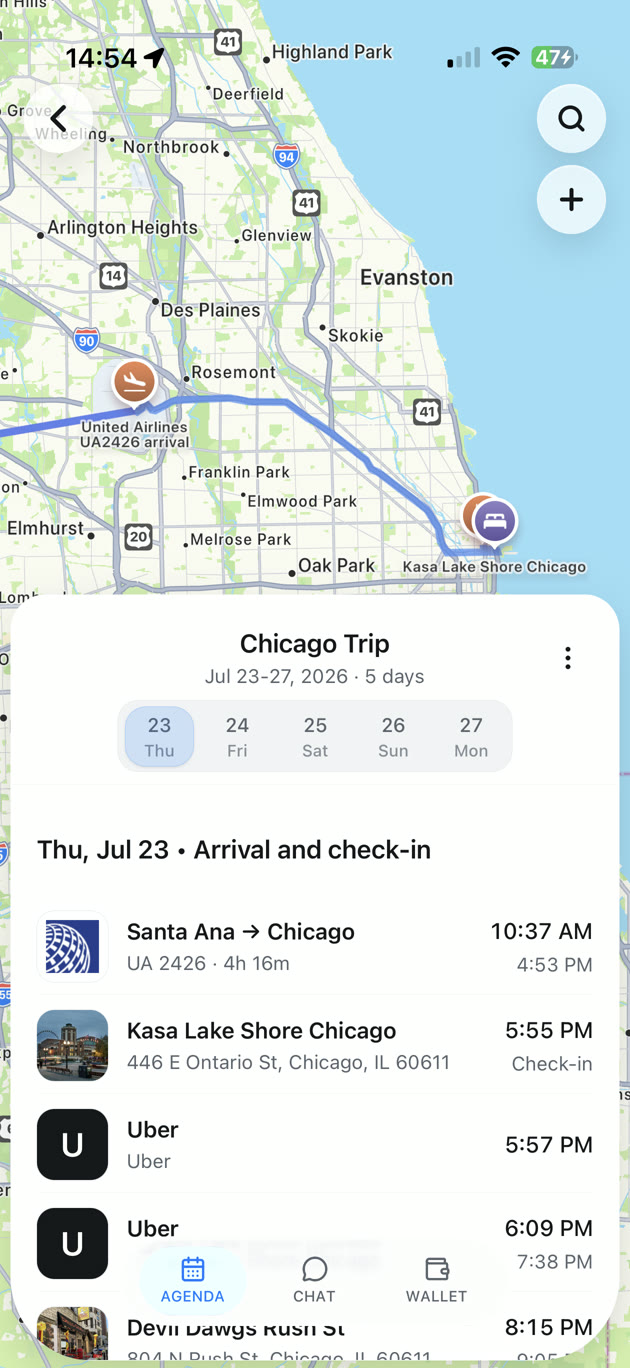
On iPhone, open TRIPS and choose your trip. Use its AGENDA for bookings and plans you want on the schedule. Keep possible stops in IDEAS until the day has room. You can add a plan by hand, so you can start without connecting Gmail.
If your travel time changes, check your current route and update the relevant plan yourself. Use the venue’s own opening hours or booking instructions for decisions that depend on entry.

What to do when your day changes
| What changed | What to do |
|---|---|
| You have less time | Recheck the route to the next booking. Cut the optional stop first. |
| An optional place is closed | Use a nearby backup only if its hours and travel time fit. Otherwise take a break. |
| The booking itself may move | Check with the provider. Change your itinerary when you have the new time. |
Before you leave home, use the final trip checklist to confirm booking times and tickets. A few gaps in the plan can give you time to enjoy the places you choose.