How to Plan a Trip From Saved Places
By TripNoted · Updated November 1, 2026
Turn your saved cafes, museums, and viewpoints into a day you can enjoy. Group places by area, protect your booking times, and leave space between stops. Start with one trip day and build around the plan you have already booked.

Turn a saved list into a workable day
- Choose one trip day. Set the date, city, and place where you will stay. If you are still choosing between cities, use our multi-city trip guide to set the order and nights first.
- Put the fixed booking first. Copy its date, local time, name, and address from the current confirmation. Keep that block in place. Do not move a ticket or reservation just to fit another saved place.
- Check every candidate. Match the place name, branch, and address to its official page. A social post or old note can point to the wrong location.
- Group by area. Compare verified addresses on a current map and keep places in the same part of town together.
- Choose one main stop and a small backup list. Add only the places that fit around the booking. Leave room for food, rest, and the journey back. Keep faraway or unverified ideas on the list until another day makes sense.
A London example: keep South Kensington together
This fictional two-day London example starts with a 14:00 museum entry on Day 1. Use the time on your own ticket.
| Saved place | Location to verify | Decision for the plan |
|---|---|---|
| Natural History Museum | Cromwell Road, South Kensington; South Kensington is the nearest Tube station. | Use it as the Day 1 anchor. |
| V&A South Kensington | Also on Cromwell Road in South Kensington. | Keep it as an optional Day 1 stop. |
| Kew Gardens | Its gates connect to Kew Gardens, Kew Bridge, and Richmond stations. | Keep it for Day 2. |
Both museums are on Cromwell Road in South Kensington, so they are a close-area pair. Kew has separate gates and station options, including Kew Gardens station in Zone 3, so it fits better on Day 2. Before you go, check current visitor details and your route with TfL’s Journey Planner.
Build the day around the booking
| Plan block | What to do |
|---|---|
| Before the booking | Travel to South Kensington and leave the earlier part of the day flexible. |
| 14:00 fixed booking | Visit the Natural History Museum at the time on your own ticket. |
| Optional nearby stop | Visit the V&A if you want another museum and the day has room. |
| Buffer | Leave space for a meal, a rest, and the return journey. |
| Day 2: Kew Gardens | Plan Kew separately from the South Kensington museum day. |
If the V&A does not fit, leave it on your saved list for another visit. Keep the fixed booking at the center and let your energy decide whether to add one nearby stop.
Use TripNoted to bring Ideas into a trip
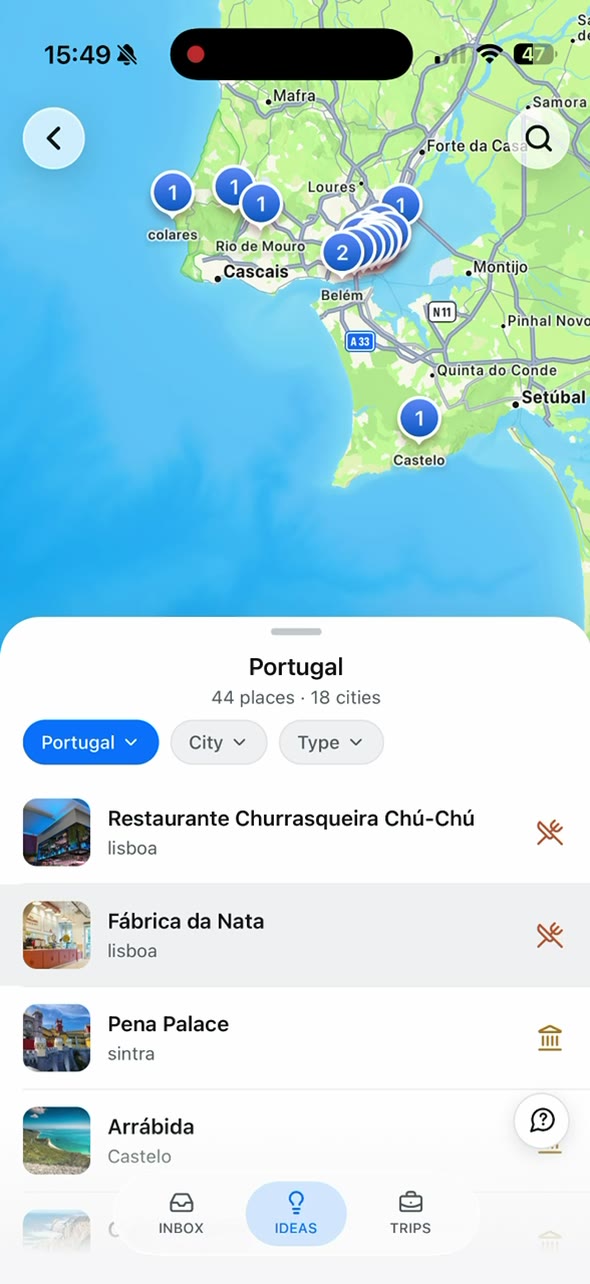
TripNoted Free includes Ideas and manual trip planning. Gmail is optional. The app groups Ideas by country, city, and type. Open a place and use add to a trip for each one you choose.
- Open IDEAS. Narrow your list by country, city, and type. Start with the places that match this trip.
- Check the place details. Confirm the name and location. Keep an idea out of the day plan if you cannot verify the right place.
- Use add to a trip. Add the candidates you want to the right trip. Use an internet connection when you add an Idea to a trip.
- Review TRIPS and AGENDA. Use the trip’s day groups to plan the dates around your fixed booking. Choose the order yourself after you check the real locations and routes.
TripNoted Free can keep saved Ideas, bookings, and daily plans together. You can start with manual trip planning; you do not need Gmail for this saved-place workflow.

For the earlier step of saving social posts as travel ideas, see how to save places from Instagram. If you prefer Google Maps for a location list, read our guide to Google Maps Lists.
Fix common planning gaps
A saved post contains several places
Open the original post and check its location tag, caption, and address. If it names several cafes or attractions, choose the branch you mean and keep the others as separate candidates.
The day looks too full
Keep the fixed booking and remove the least important optional stop. A place can stay saved for another visit. If several cities are involved, settle the city order and nights before you sort places into dates.
A saved place is far from the booking
Do not try to squeeze it in because it is on the same list. Check its area and route on its official page or a current map. Put it on a separate day when that makes the plan easier.
Choose where to keep the plan
| Option | Useful for | Keep in mind |
|---|---|---|
| Notes or a spreadsheet | A short candidate list beside your booking details. | Check locations and routes in a current map or official source. |
| Google Maps Lists | Keeping named places together and comparing their locations. | Make the day plan around ticket times and dates yourself. See our Google Maps Lists guide. |
| TripNoted Free | Keeping saved Ideas with a trip and its Agenda. | Choose the date and order that fit your booking. |
Once the day is clear, share the itinerary with the people traveling with you. Keep fixed bookings and optional Ideas clear so everyone knows what is confirmed.
Common questions
Does a saved place already belong to a date?
No. Treat it as a candidate until you choose a day. In TripNoted, add to a trip adds your selected place to the trip; use AGENDA to review day groups and plan around your booking.
Do I need to connect Gmail?
No. TripNoted Free includes Ideas and manual trips without Gmail. If you choose to connect Gmail on Free, the plan supports one account and an initial import of the last six months; the saved-place steps do not need that import.
Can an app choose the best route for me?
Use a current mapping or transit service to check routes for your date. TripNoted helps keep Ideas and trip plans together, but you choose the order and confirm current travel details.