The travel planning guide
Wanderlog Free vs Pro: Is the Upgrade Worth It?
Wanderlog Free is enough to build an itinerary, put your stops on a map, plan with friends, and split trip expenses. Pro is worth considering when you want downloaded offline plans, automatic Gmail imports, or help putting a busy day’s stops in a better order.
You do not need to pay just to start planning a good trip. The useful question is which extra job you want the app to do before you leave, or while you are away.
Here is what changes when you upgrade, when Free is enough, and where TripNoted Free can give you the tools you want without another subscription.
At a glance
Wanderlog Free vs Pro
Plan details checked October 5, 2026. On a phone, scroll the table sideways.
| What you need | Wanderlog Free | Wanderlog Pro |
|---|---|---|
| Itinerary and map | Build days, save places, and arrange stops | Everything in Free |
| Road-trip stops | Unlimited stops; arrange them yourself | Optimize the order of a day’s stops |
| Plan with friends | Invite people to view or edit | Everything in Free |
| Budget and shared costs | Track expenses and split bills | Everything in Free |
| Booking emails | Forward confirmations to your trip | Connect Gmail for automatic scanning |
| Offline trip downloads | Download feature requires Pro | Save plans, notes, places, and attachments in the mobile app |
| Google Maps export | Use the map inside Wanderlog | Export saved places to Google Maps |
| Price | Free | Starts at $39.99 a year on Wanderlog’s pricing page |
The free plan handles much of the planning itself. Pro adds convenience around imports, offline downloads, and route order. Start with the task that matters to your trip, rather than buying the larger feature list.
A useful plan before you pay
What can you do with Wanderlog Free?
Say you are spending a weekend in San Francisco. You want to save a few restaurants, choose a museum, and keep the hotel beside the day’s plans. Wanderlog Free lets you collect those places, see them on a map, and arrange them into an itinerary.
You can add unlimited road-trip stops too. The free plan does not force you to upgrade because you have a long list of places. You can move stops around yourself and use the map to keep nearby visits together.
Planning with friends is also part of Free. Invite companions to view or edit the trip. Budgeting, expense tracking, and splitting bills are included, so one person can record dinner while another keeps track of the hotel cost.
You can bring in flight, hotel, and rental-car details by forwarding confirmation emails to the address for your trip. Automatic scanning of a connected Gmail account is a Pro feature. Forwarding a booking and connecting an inbox are two different ways to get the same details into a plan.
For a short trip where you are happy to add bookings and arrange the days yourself, Free is a strong starting point. Our Wanderlog vs TripIt guide compares that planning style with a booking-focused organizer.
Less sorting, more exploring
When does Wanderlog Pro help?
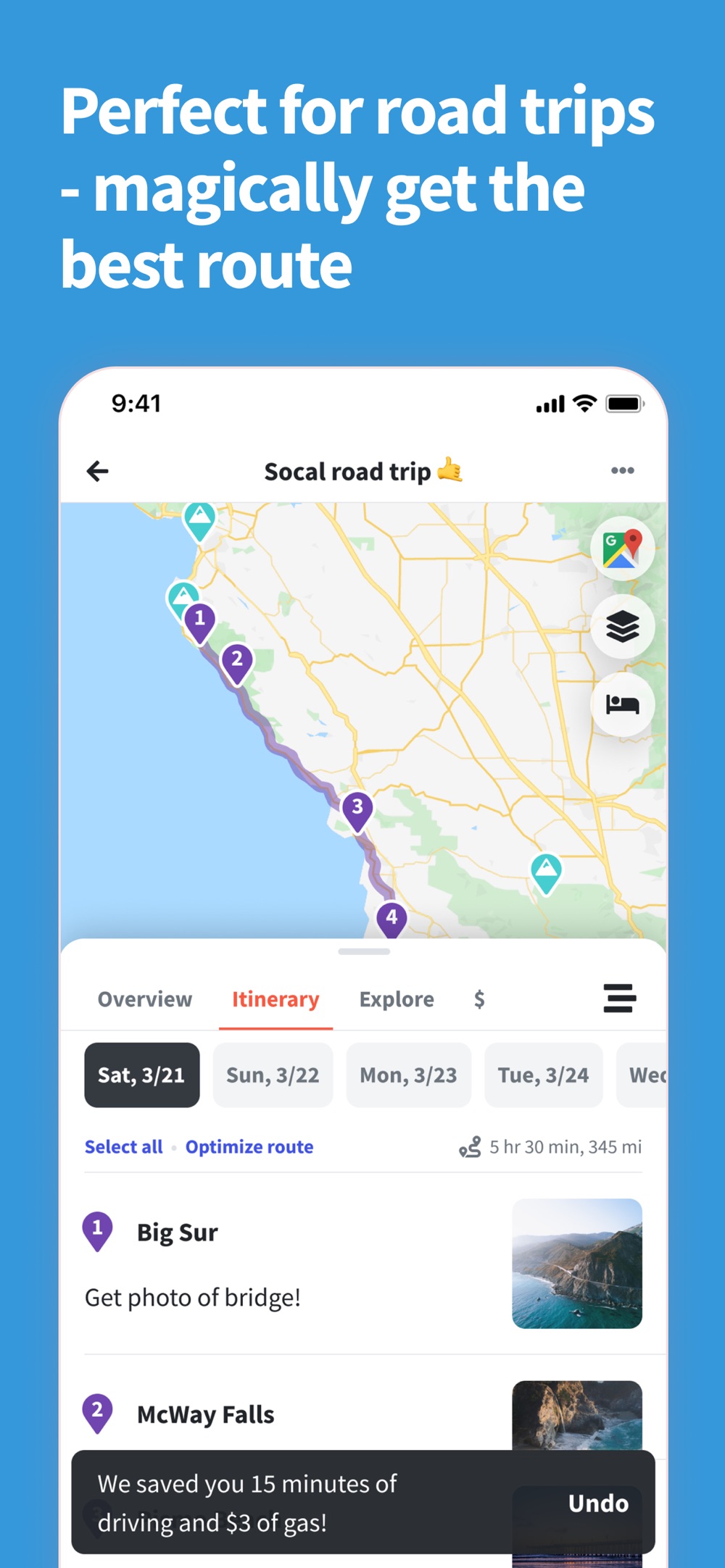
A day with several driving stops. Pro’s route optimizer can rearrange one day’s itinerary to reduce travel time. You choose the start and end points, or let the app suggest them, then review the new order. You can undo it if it does not suit the day you want.
That is useful for a road trip with viewpoints, lunch stops, and a hotel at the end. It is less useful when your day is already fixed around timed tickets. A shorter route is only helpful if it still leaves room for the things you came to do.
Bookings spread across your inbox. Pro can scan a connected Gmail account for reservations. This saves forwarding each confirmation yourself. It is a convenience upgrade if that is the part of planning you keep putting off.
Places you want in Google Maps. Pro lets you export saved places to Google Maps. That can help when Wanderlog is where you organize the trip, but Google Maps is what you prefer to open while moving around.
A trip with poor signal. Downloaded mobile plans are another reason to consider Pro. They let you keep the itinerary close when mobile data is expensive or unreliable. Prepare the download before leaving the connection behind.
Pro also includes unlimited attachments and unlimited AI assistance. Wanderlog also advertises live flight updates and notifications with Pro. Those extras may help if you keep lots of files with a trip or use the assistant often. For the first decision, focus on the tools you already know you want to use.
The plan when you need it
Do you need Pro for offline access?
Wanderlog’s Help Center puts downloaded offline trip plans in Pro. Its instructions cover notes, places, and attachments saved in the iPhone or Android app. For a trip where you need that download feature, include Pro in your decision.
Open the trip while you have internet and let it finish loading. Then check for the download icon beside the trip on the Profile tab. That is the useful check before a flight, a long drive, or a day without mobile data.
Keep navigation separate from the itinerary. Exporting places to Google Maps does not itself download an offline Google Maps area. Prepare any maps and essential tickets in the apps where you will use them.
If your main reason to pay is access to saved trip details without a signal, TripNoted Free is worth a look. Its iPhone app includes saved trip details and supported offline edits.
Pay for a job you need done
How much does Wanderlog Pro cost?
Wanderlog Free costs nothing. Its Pro pricing page advertises an annual subscription starting at $39.99 a year. The United States App Store lists several annual purchase offers, including $39.99 and $49.99. Use the price and renewal terms shown on your purchase screen for your account and region.
Before starting a trial, check how long it lasts, the annual price after it, and when you need to cancel if you do not want to keep Pro. A trial is most useful when you already have a trip to test: import a booking, download the plan, and try optimizing a day you have built.
The upgrade makes more sense when you will use several of its tools. For one city weekend with a few fixed plans, manual forwarding and arranging stops may be enough. For a road trip with a busy route and unreliable signal, route optimization and offline downloads have a clearer job to do.
Start with your next trip
Should you stay on Free or upgrade?
Stay on Wanderlog Free if you mainly want a map, daily plans, shared editing, and a way to keep group costs clear. You can do useful planning before paying.
Consider Wanderlog Pro if you want its route optimizer, automatic Gmail scans, Google Maps exports, or offline trip downloads. Try those jobs on the actual trip you are planning.
Try TripNoted Free if you want automatic Gmail booking organization and offline access on iPhone without paying for those features. Shared editing and flight delay alerts are included too.
You do not need to move every past trip to make a choice. Start with the next one: bring in the flight and hotel, add a day of places, and invite a companion. A useful plan will tell you more than a long list of features.
More of your trip, on Free
Bring bookings, saved places, and flight alerts together
The flight is booked. A friend sends a restaurant video. You have a museum link saved for later. TripNoted gives those pieces a place in the same trip, without making automatic Gmail imports or offline access on iPhone a paid upgrade.
Connect one Gmail account to organize recognized bookings. Free starts with a six-month import and scheduled refresh about once an hour. Save supported travel links as Ideas, then add the places you choose to the itinerary. You can create trips and plans by hand too.
Invite a friend to view or edit the trip. Keep saved details on your iPhone and make supported edits offline, with changes syncing when you reconnect. You also get five Trip Assistant questions per trip and access on the web when you have internet.
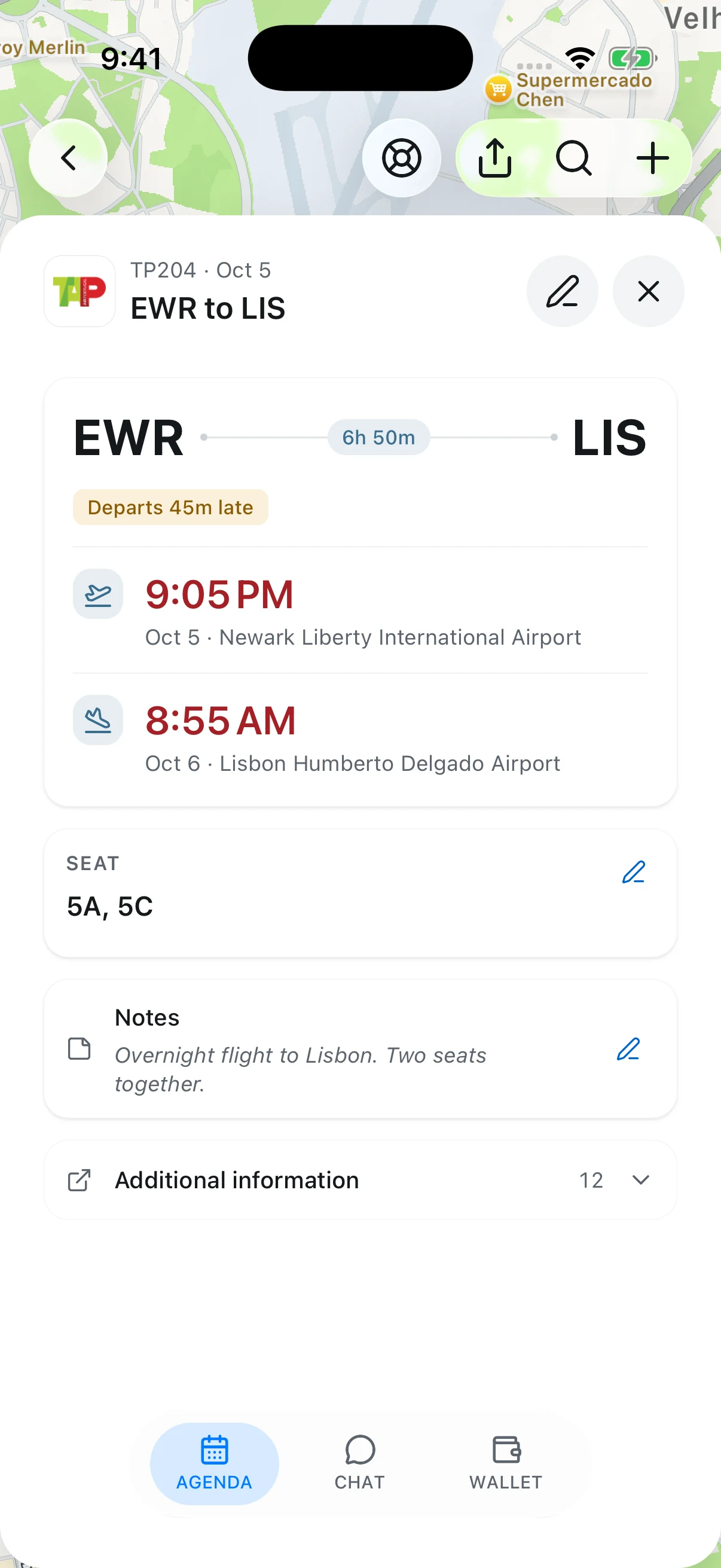
Flight alerts are free too. Get an alert if your flight is delayed or its departure time changes. Add your flight, turn on Flight alerts in Settings > Notifications, and allow notifications on your phone. See how to turn on flight alerts.
If you need automatic route optimization or group expense splitting, Wanderlog has tools for those jobs. TripNoted Free is our pick when you want bookings, inspiration, shared plans, and departure alerts together on iPhone. See the Free plan details or compare TripNoted and Wanderlog.
Common questions
Wanderlog Free vs Pro questions
Is Wanderlog free for group trips?
Yes. You can invite friends to view or edit, plan days together, track expenses, and split bills without Pro. Upgrade for the Pro tools you want, rather than just to plan with a group.
Can Wanderlog import booking emails for free?
You can forward flight, hotel, and rental-car confirmations to your trip. Automatic scanning of a connected Gmail account is a Pro feature. TripNoted includes automatic import from one Gmail account on Free.
Does Wanderlog Free have route optimization?
You can add stops and arrange them yourself on Free. The automatic tool that rearranges a day’s stops is part of Pro. It is most useful when your visit order is flexible.
Can I use Wanderlog offline without Pro?
Downloaded offline trip plans are a Pro feature in Wanderlog. That matters if you want your plans ready before you lose signal. TripNoted Free includes saved trip details and supported offline edits on iPhone.
What is a free alternative to Wanderlog Pro?
TripNoted Free is a good option for automatic Gmail imports, bookings and saved Ideas, shared editing, offline access on iPhone, and flight delay alerts. It has a web version, but no native Android app. Choose based on the tools you need; TripNoted does not offer Wanderlog’s automatic route optimizer or group expense splitting.
Your next trip can come together here
Start with TripNoted Free.
Bring in your bookings. Save the places that caught your eye. Invite a friend to help build the days. Keep your trip details and flight alerts together.