How to Organize a Cruise and Land Itinerary After You Book
By TripNoted · Updated October 31, 2026
Put your booked cruise, flights, hotel nights, transfers, port days, and return flight in one ordered plan. Label every time as ship time or local time. Then check the cruise line’s current boarding, all-aboard, and disembarkation instructions for your sailing.
1. Put the full trip in travel order
Start with the first flight and continue until you reach home. Add the cruise between the travel days that lead to it and the travel days that follow it. Keep a hotel night or transfer as its own item. This makes a missing connection easier to see.
- Before the cruise: add each flight, airport, hotel night, and ride to the port. Include the date and local time for each airport or hotel.
- Embarkation day: record the port address, the arrival appointment shown by your cruise line, and any transfer pickup. Keep the appointment separate from the ship’s sailing time.
- During the cruise: list each port call, ship day, excursion, and transfer. Keep time at sea as a real part of the plan, even when no stop is scheduled.
- After the cruise: add the assigned disembarkation time, port-to-airport or hotel ride, post-cruise stay, and return flight as separate steps.
Check the latest booking or cruise-line app when you enter each detail. If the app and an older email show different times, confirm which one applies before you travel. Royal Caribbean says the arrival slot selected in its app check-in appears on the mobile boarding pass. Use the current time for your own sailing. Read Royal Caribbean’s port-arrival guidance. For a hotel arrival before check-in or after midnight, see our hotel check-in and check-out guide.
2. Mark the clock beside every time
Use a clear time label such as “ship time,” “port local time,” “airport local time,” or “hotel local time.” Do not leave a time unlabeled when your plan crosses time zones. Your phone may change its clock when it connects to a local network. The ship’s schedule can use a different clock.
Rules can differ by cruise line and activity. Royal Caribbean says its shore-excursion times are based on ship time. Its Australia “What to know before you go” page also says activities, reservations, and port arrivals and departures use ship time. Check your cruise line’s app, daily schedule, and onboard notices. Record local time separately when a shore operator, hotel, airport, or transfer gives a time in the port’s local clock. Our time-zone guide explains how to keep local times clear.
Royal Caribbean’s shore-excursion time guidance and its ship-time instructions are examples for that cruise line. Check the current information for your own ship and sailing.
3. Give each port day its own return plan
For every port call, write down the date, port, terminal or tender details, the ship’s arrival and departure times, and the source of those times. Add the excursion meeting point, pickup time, and expected return. If you plan to explore on your own, choose a personal time to reach the pier before the confirmed all-aboard time.
All-aboard means you must already be back on the ship. It is not the time to leave a beach, museum, or meeting point. Leave space for the trip back, lines, tender boats, and finding the correct gangway. The space you need depends on the port, route, and activity. Do not use one timing rule for every stop.
Royal Caribbean tells guests who explore independently to follow the return time announced onboard and posted near the gangway. Its FAQ says the ship will not wait for guests who make their own plans. Read Royal Caribbean’s shore-excursion guidance.
4. Connect the port and the land transfers
Make each ride a separate line in your plan: airport to hotel, hotel to port, port to hotel, or port to airport. Record the pickup place, date, time, provider, and whether you have a booking. Keep a ride estimate and your own return goal in separate fields. Do not treat a ride estimate as a confirmed pickup time.
Before you leave, check the current transfer instructions for your port. A transfer that is included with a cruise package can have different rules from a taxi, train, or ride that you arrange yourself. Check the terminal, meeting point, luggage instructions, and the provider’s latest contact details. For example, Carnival lists airport-transfer times by port. Those limits apply to the listed port and service. They are not general flight or transfer rules.
Use the port-day and transfer worksheet
Open the blank printable worksheet for a paper copy, or download the CSV file to use in a spreadsheet. Both keep ship time, local time, confirmed all-aboard time, your return goal, and transfer details in separate fields.
Leave a note about where each important time came from and when you checked it. Update the worksheet if the cruise line changes the schedule. Do not write a passport number or full booking code on a paper copy that other people can see.
A fictional cruise and land plan
Here is a fictional May 2027 trip. It shows how to separate booked events, ship time, local time, and your own return goal. Use the actual times from your sailing when you build your plan.
| Date and event | Clock and time | What the traveler records |
|---|---|---|
| May 13 · Arrive at Harbor City | Airport local time · 1:20 p.m. | Flight arrival, hotel address, and a separate ride from the airport. |
| May 14 · Board at Pier 2 | Port local time · 10:00 a.m. arrival appointment | The arrival appointment from the boarding pass and the hotel pickup location. |
| May 15 · Port Example | 9:00 a.m. ship time; 10:00 a.m. port local time | All-aboard is 4:30 p.m. ship time in this example. The traveler sets a personal 3:30 p.m. ship-time return goal and records the route back. |
| May 19 · Disembark and fly home | 8:15 a.m. assigned ship-time group; flight at 1:30 p.m. airport local time | The traveler checks the current port-to-airport advice and transfer plan before deciding whether the booked flight fits. |
Notice how the port-day row keeps the ship’s deadline separate from the traveler’s return goal. The last row keeps the assigned disembarkation time separate from the flight departure.
Keep the booked details together with TripNoted Free
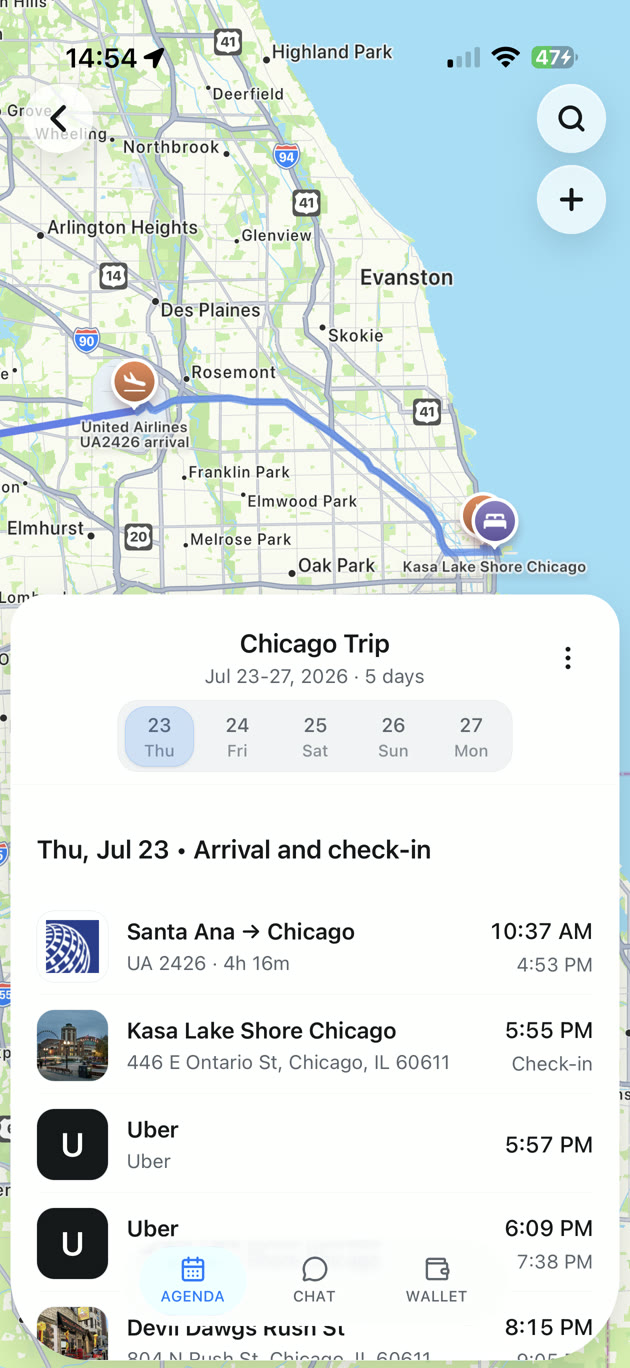
TripNoted can keep flights, hotel plans, transfers, and manual notes in one trip. Use the web app online, add a plan yourself, or connect Gmail to organize recognized booking emails. Gmail is optional. Free supports one Gmail account, an initial import of the last six months, and a scheduled refresh every 60 minutes. Add port calls, shore plans, and any missing transfers by hand, then check the dates and times against your confirmations.
On iPhone, you can read saved trip details and add or edit manual itinerary items offline after the trip has loaded. Open the trip while you have a connection before you board. Gmail refresh and current cruise-line notices still need internet. You can share a trip with view or edit access; see our guide to sharing a travel itinerary.

Keep three different times separate
| Time to record | Where to check | Why it needs its own line |
|---|---|---|
| All-aboard time | Your cruise line’s current onboard app, daily notice, or gangway notice | You must be on the ship by this time. |
| Your return-to-pier goal | Your chosen plan for the activity and route back | It gives you time to reach the ship before all-aboard. |
| Earliest return-flight guidance | Your cruise line’s current instructions for the port and transfer | It helps you judge the flight after disembarkation, luggage, customs, and travel to the airport. |
On the final morning, also check your luggage group and assigned disembarkation time. Royal Caribbean says luggage tags can set the ship-departure order and that guests who arrange their own transport are responsible for reaching the airport or hotel. Check Royal Caribbean’s disembarkation instructions and the current transfer rules for your port before you travel.
To prepare the plan for a weak connection, see how to keep an itinerary available offline before you sail.