How to Make a Travel Itinerary From Your Bookings
By TripNoted · Updated
Open a blank document and put each booking under its local date. Start with transportation, hotel check-in and checkout, and any timed tickets. Add the travel time between them. Then use the space left for optional stops. You should be able to see where you need to be next and when to leave.

Make your itinerary in a document
- Set up one heading per date. Include the weekday and exact date. If you change cities, name the city where you start the day and the one where you sleep. Use one line per plan with the time, place, and a short label: Booked, Planned transfer, or Optional. In Google Docs on a computer, use Insert, then Table if you prefer columns.
- Copy the fixed details from the latest confirmations. Write the flight or train number, the exact airport or station, and the departure and arrival dates and times. Use the local time at each end. If a flight lands after midnight, put the arrival and onward transfer on the next date. For a hotel, write the check-in date, the nights you booked, the checkout date, and the address. For a timed ticket, include the entry point and any required early arrival.
- Work backward from the next fixed time. If you need to reach a venue by 10:45 and the trip takes 25 minutes, leaving at 10:20 gives you zero spare time. Leave earlier to cover traffic, waiting, or a wrong entrance. After a flight, account for bags and the time it takes to reach your ride or train. For a return flight, use the carrier’s airport arrival guidance to set your target, then work back to a hotel departure time.
- Put optional stops in the gaps. Check opening hours and the route between the previous and next plans. Include time to visit and to get back on route. If the gap is too short, keep the place on a separate list and decide on the day.
- Read each day from start to finish. Look for dates that cross midnight, hotel nights that do not cover your arrival, and transfers that depend on perfect timing. Keep a link to the latest confirmation or the reference number beside the booking in your private copy. If you share the plan more widely, remove private references and links that grant booking access.
Prefer a blank file with the columns ready? Use the travel itinerary template and fill it in as you follow the same steps.
Three-day example with two hotel nights
This fictional weekend uses local times at the destination. The flight and timed visit set the schedule. The hotel confirmation covers Friday and Saturday nights, with checkout on Sunday.
| Day | Source details | What goes in the itinerary |
|---|---|---|
| Friday | Flight arrives at 18:40. The hotel accepts check-in until 22:00. | 18:40 flight arrival (booked). Plan time to collect bags, then allow 45 minutes for the transfer to the hotel. Check in before 22:00. Keep the evening clear. |
| Saturday | Timed visit at 11:00 with arrival by 10:45. A saved market is nearby. The hotel stay continues. | 10:05 leave the hotel (planned transfer: 25 minutes plus 15 spare). 11:00 timed visit (booked). Visit the market afterward (optional) if the route and opening hours work. |
| Sunday | Return flight at 08:30. In this example, the carrier asks travelers to reach the airport by 06:30. | Check out before leaving the hotel at 05:30. Plan 45 minutes for the transfer plus 15 spare. 08:30 return flight (booked). Leave the rest of the morning open. |
If the Friday flight runs late, skip any optional stop you had in mind for arrival day. Try it after Saturday’s visit only if it fits. If the delay puts check-in close to or past 22:00, contact the hotel to confirm how to get in and update Friday’s transfer. Confirm the Sunday checkout and early ride ahead of time, too.
Add the same plans to TripNoted
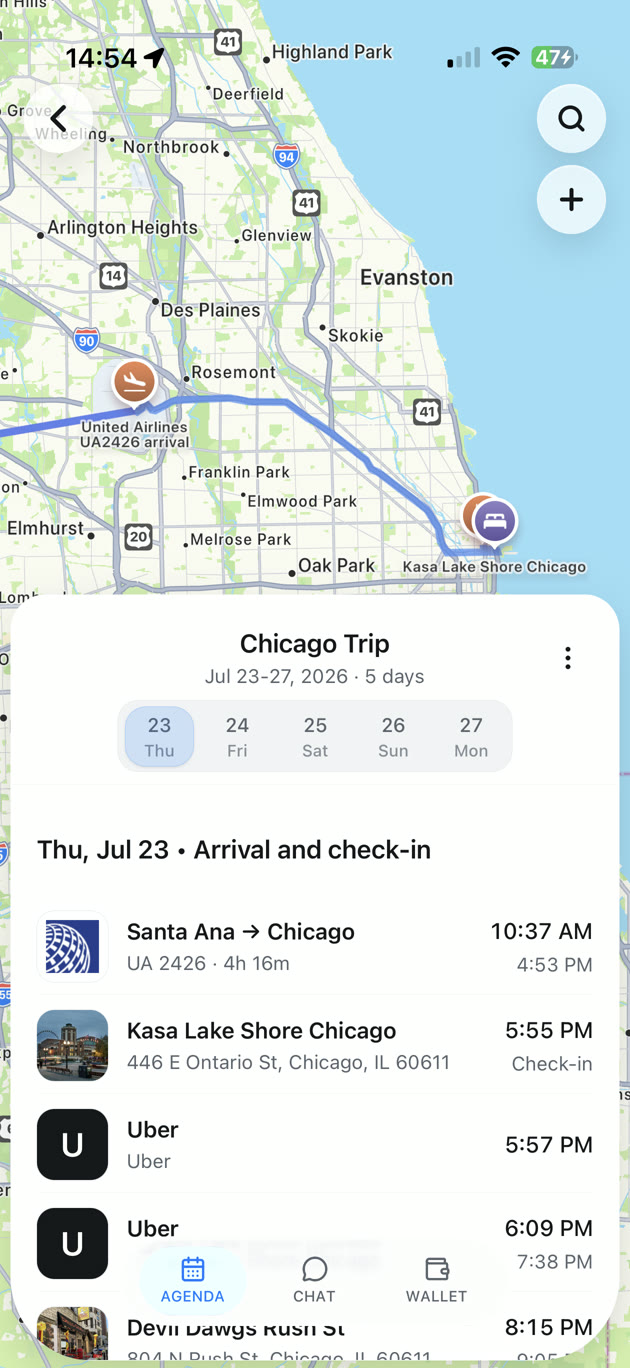
It’s free to create a trip by hand and edit its itinerary in TripNoted. Gmail is optional. On iPhone, open the trip and use Add Plans. Select a plan type, enter a title and location, and add the dates, times, and traveler notes you need. Then review the order in the agenda.
For this weekend, add the flight, hotel stay, and timed visit first. Add a separate plan for each transfer you want to see on the day. Keep the market in Ideas until you decide to go. The guide to planning from saved places shows how to decide where it fits. If you prefer to start with import, see how to make an itinerary from email.

Use a calendar for timed plans
On a computer in Google Calendar, choose Create, then Event. Enter the time and location, then select Save. Add a separate event for a transfer if you want a reminder to leave. For a flight across zones, use separate start and end time zones and check the local date at each end.
When a booking moves, update it where you keep the itinerary, then check the plans on both sides of it. Before departure, use the final trip checklist to check the current provider records, the tickets you can open, and the order of each day.
Choose a document, calendar, or itinerary app
| Tool | Good for | What you maintain |
|---|---|---|
| Document | A trip overview you can edit, print, or send. | Day order, times, and links to confirmations. |
| Calendar | Timed events and reminders alongside your schedule. | Event times, time zones, and travel blocks. |
| Itinerary app | A trip agenda with bookings, transfers, and saved places. | Details from providers and any plans you add or change. |