Travel Journal vs. Itinerary Organizer: Which Do You Need?
By TripNoted · Updated November 9, 2026
Choose an itinerary organizer when your main job is to plan days, check bookings, or keep addresses and times together. Choose a travel journal when you want to record what happened and remember how the trip felt. If you want both, plan with an organizer and save the stories and reflections in a journal.

Choose by what you want to do
| Your task | Start with | Keep there |
|---|---|---|
| Check where to be and when | Itinerary organizer | Dates, times, addresses, transport, stays, and tickets. |
| Write down what you noticed | Travel journal | Short entries, photos, favorite moments, and personal reflections. |
| Get ready for tomorrow | Itinerary organizer | Tomorrow’s plan, route details, and booking information. |
| Remember how a place felt | Travel journal | The story behind a photo, what surprised you, or what you would do again. |
| Plan now and remember it later | Both | Keep practical details in the itinerary and personal notes in the journal. |
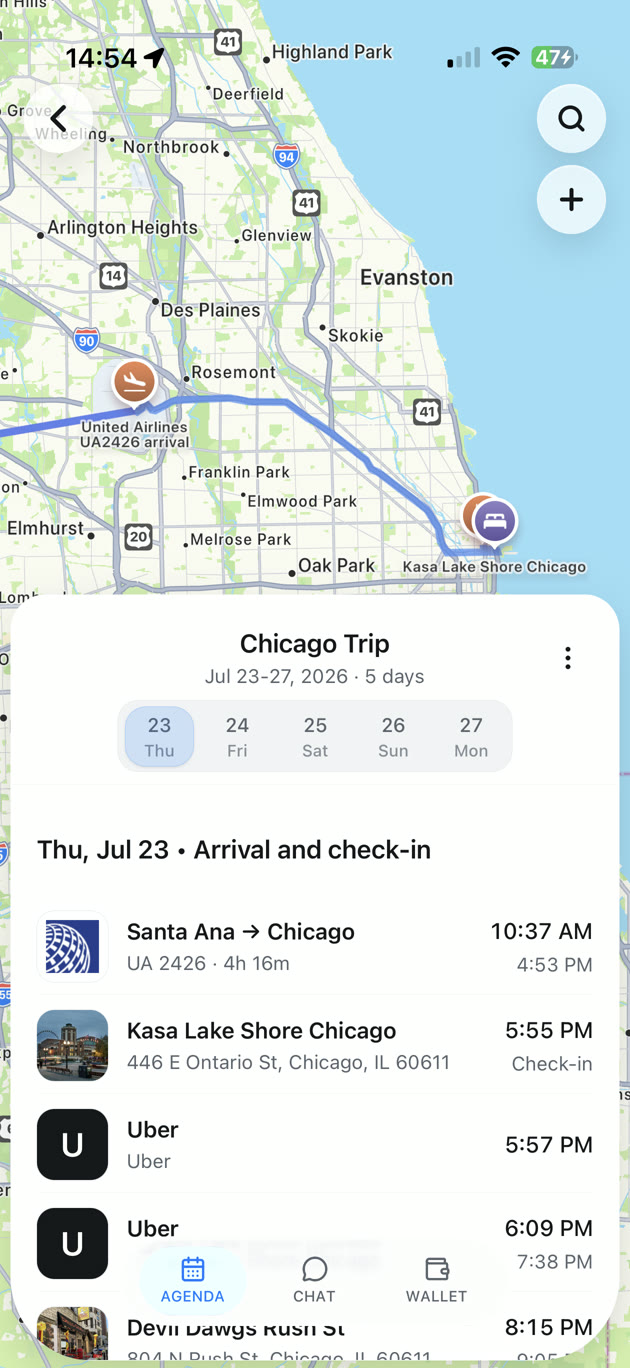
Some journal apps can show where entries were made on a map. That helps you revisit a memory. A trip organizer uses a map to help you understand where planned places and bookings fit. The map may look similar, but the job is different.
Example: one weekend, two useful records
Imagine a fictional weekend in Chicago. Your flight lands Friday afternoon. You check in at a hotel, visit an art museum on Saturday, and take the train home Sunday. The museum is a timed booking. You have also saved a nearby bakery as a possible stop.
Before the trip, put the flight, hotel address, museum time, and Sunday train in the itinerary organizer. Add the bakery as a possible stop. Say your museum ticket is for 11 a.m. Put that time and the entrance address in the plan. Leave the bakery flexible so you can stop after the museum if you have time.
Your journal entry might read: “Saturday, Chicago. We followed the smell of cardamom into a little bakery after the museum. Next time, bring one of those rolls to the lake.” Add a photo if you took one. The date and a detail are enough to bring the moment back.
Use an itinerary organizer for the trip details
An itinerary organizer is useful before you leave and while you travel. It gives practical details a clear place, such as:
- Arrival and departure times, check-in dates, and ticket times.
- Addresses, confirmation details, and the original booking source.
- Stops you may want to visit, grouped around the day’s plan.
- Changes you need to review when a provider sends an updated confirmation.
TripNoted is a travel organizer for bookings and saved travel links. Its free plan lets you add trips and plans by hand, save links and places as Ideas, and organize details in a trip. You can use it without connecting Gmail. See how to build an itinerary from booking email or how to plan a trip from saved places.
Use a journal to keep the personal story
A journal works well for details you choose to capture. Write a few lines at the end of the day, add a photo, or note why one stop mattered. For example, Day One’s Map View lets you revisit journal entries by location.
Keep entries short if a full diary feels like work. One photo with a note such as “take the side street back at sunset” can be more useful to your future self than a long account of every stop.
Keep a simple journal without adding another app
A paper notebook, notes app, or photo album can work if you want to save a few moments. Add the date and place to each note. If you use only photos, add a short caption while the memory is fresh. This makes a small collection easier to follow when you look back later.
For the itinerary, keep the current booking details and next step in one place. Before departure, use our final trip checklist to check the details you will need on travel day.
See how bookings fit into a trip plan
TripNoted helps you bring bookings and saved places into one itinerary. Your trip agenda shows the dated plans in order. Use IDEAS for places you might want to add. Keep a journal alongside it for your own words and memories.

Can you use both?
Yes. Give each tool a clear job. Keep booking details and the next plan in the itinerary organizer. Keep your observations and memories in the journal. You do not need to copy every item into both. Add a link between a journal entry and a trip only if your tools support it and you will use it.
If you want to begin with a clear daily plan, see how to build a flexible travel itinerary. If you want to keep and revisit past bookings, read how to find and organize your past trips.
Common questions
Is a travel itinerary the same as a travel journal?
No. An itinerary organizes dates, bookings, and places for the trip. A journal records personal moments and reflections.
Can a travel journal include a map?
Some journal apps show entries on a map. Use that view to revisit recorded entries. Use an itinerary map to plan or check places and bookings.
Should I write in a journal every day?
Only if it suits you. A short note, photo caption, or occasional entry can make a useful record.