The travel planning guide
TripIt vs Tripsy: Which Travel Organizer Should You Choose?
Choose TripIt if you want booking emails organized for free and need to plan across iPhone, Android, and the web. Choose Tripsy if you prefer Apple apps and want more control over what your travel companions can see. Its Pro plan adds documents, expenses, and tools to import travel ideas.
Both help you keep flights, hotels, and activities together. The useful difference is what happens around those bookings: who can edit the plan, where you can open it, and which everyday tasks require an upgrade.
Here is how TripIt and Tripsy compare for your next trip, plus a free option worth considering if you want your bookings and saved places together.
Start with your next task
TripIt vs Tripsy at a glance
On a phone, scroll the table sideways to compare the apps.
| What matters to you | TripIt | Tripsy |
|---|---|---|
| Best fit | Booking organization across iPhone, Android, and web | Planning on Apple devices, with more guest controls |
| Booking emails | Forward confirmations or use supported Inbox Sync; Free | 10 introductory forwards listed for new users; ongoing forwarding with Pro |
| Places and daily plans | Manual plans and a mobile trip map | Activities, maps, and Pro Smart Import from links and files |
| Shared editing | View or edit invitations; Free | Collaborator or view-only guests; separate document and expense permissions |
| Trip documents | 3 uploads per trip on Free; 25 with Pro | Document storage with Pro |
| Offline use | Saved mobile itineraries; Free | Offline trip access; documents and forwarded emails with Pro |
| Costs | Booking cost fields | Expense management and currency conversion with Pro |
| Flight alerts | Pro adds alerts and airport tools | Pro adds flight-change notifications |
| Devices | iPhone, iPad, Apple Watch, supported Macs, Android, and web | iPhone, iPad, Mac, and Apple Watch; web viewing |
| Browser editing | Create and edit trips on the website | View online; create and edit in the Apple apps |
| Paid options | $49 a year for Pro | $59 for one year on the website; monthly and lifetime options also offered |
For a simple booking organizer, TripIt gives you a strong free starting point. Tripsy becomes more compelling when you want its Apple apps, guest controls, and paid planning tools together.
From confirmation to itinerary
TripIt includes email organization for free
Once the flights and hotel are booked, the first job is to get the details out of your inbox. TripIt lets you forward confirmation emails on its free plan. You can also connect a supported mailbox through Inbox Sync to bring in bookings automatically.
That is a useful distinction if you want a free app to do the routine work. Inbox Sync supports Gmail, Google Workspace, Yahoo Mail, Outlook.com, and Microsoft 365. You can still forward emails from other accounts.
Tripsy also turns forwarded reservation emails into itinerary entries, with ongoing forwarding on Pro. Its sharing guide also lists 10 introductory email forwards for new users. You can create trips and add activities yourself on Free; include Pro in the decision if you want email organization beyond that starting allowance.
Both apps let you add the parts of a day that never arrive as a booking email. A walk, a museum visit, or lunch with a friend can belong in the same plan as the flight and hotel.
Tripsy Pro also has Smart Import. It can turn supported links, screenshots, documents, and text into places or reservations. You review the results before adding them. This is helpful when your plans start with a map list or a saved post rather than an email.
TripIt Pro has a photo and PDF import option through Apple Intelligence on supported Apple devices. If you want to import a ticket instead of entering it by hand, check that your device supports the feature.
When a booking changes, keep the new confirmation and check the dates and times in your itinerary. Treat the organizer as your trip plan, and use the airline or booking provider for changes to the reservation itself.
One plan for the group
Tripsy gives you more specific guest controls
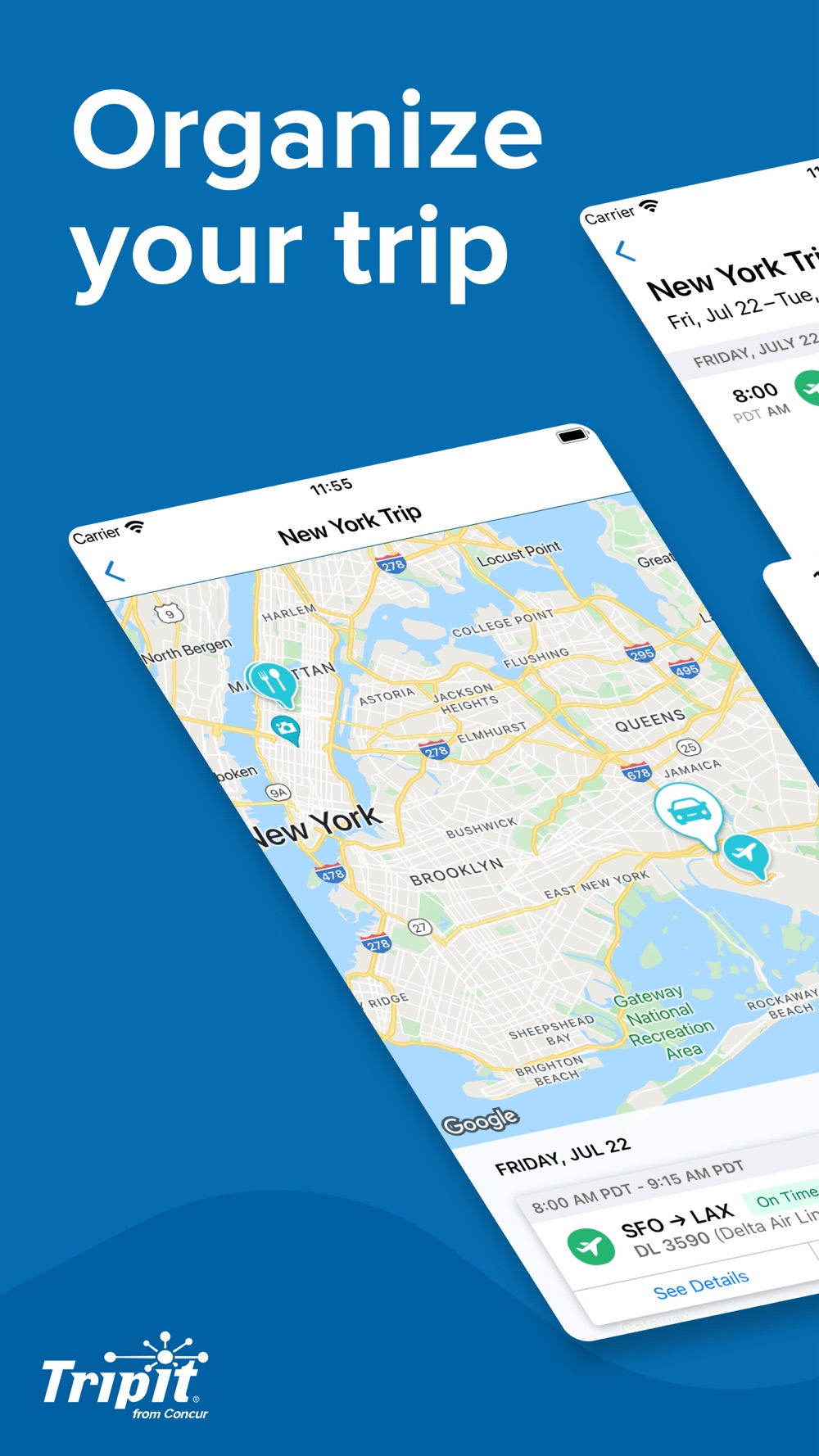
Imagine a weekend in New York. You and a friend are choosing restaurants. Your parents want the flight times. Everyone needs the hotel address, but not everyone needs to change the plan.
TripIt covers that basic split with view or edit invitations. Shared editing is available on Free. A private invitation gives another traveler access to the trip; a read-only link is useful when someone only needs to follow along.
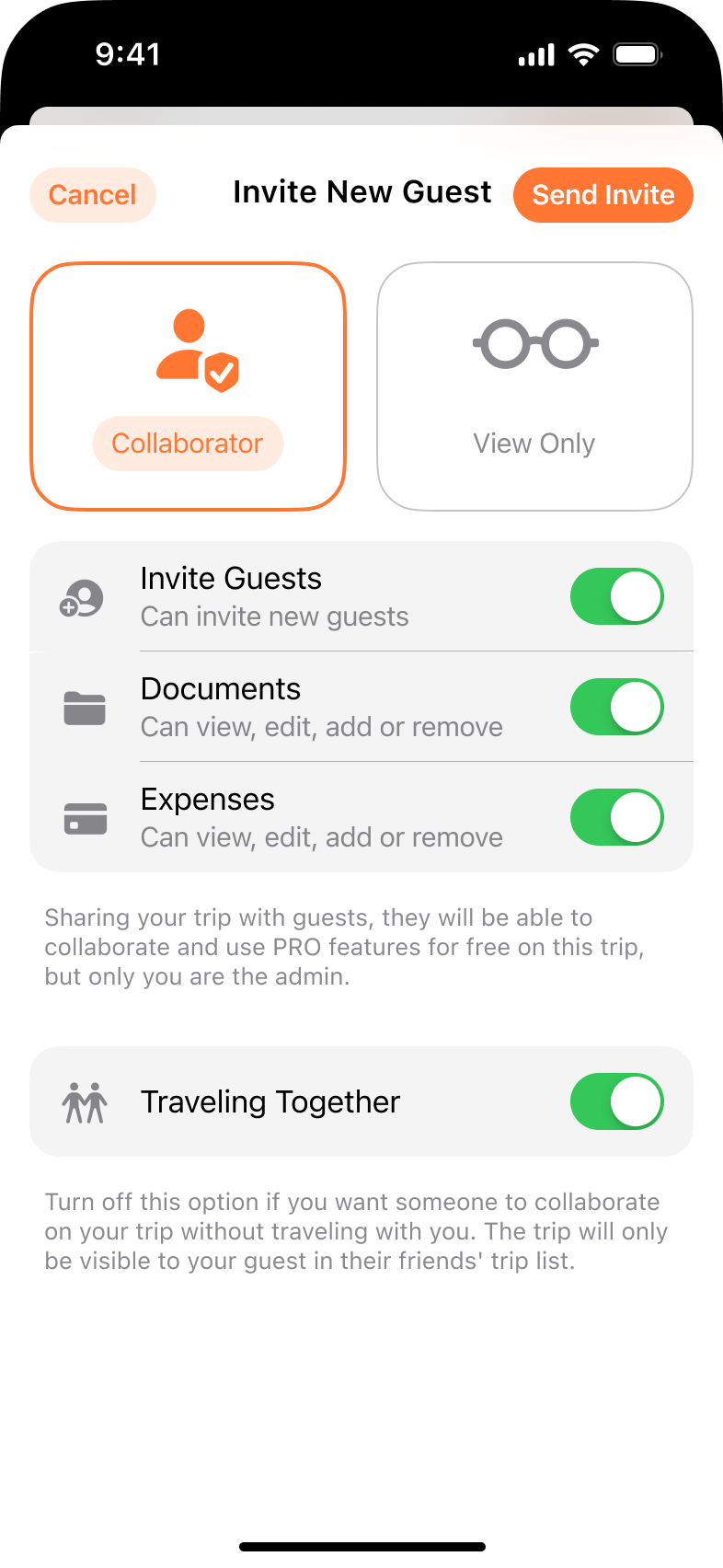
Tripsy lets you choose a collaborator or a view-only guest. It also separates access to documents and expenses. You can let a friend help with the itinerary while keeping those details private. That is a practical benefit when different people need different parts of the trip.
Tripsy guests who collaborate use the app and a free account. A read-only web link lets someone check the plan in a browser. Pick the sharing method that fits the person you are inviting.
For a group that mainly wants to build the days together, start with shared editing. More permission controls are useful when you need them, but they do not have to be the reason you buy a travel app. Our group trip planning apps guide compares more options.
Phone + computer
Your devices can make the choice easier
TripIt has iPhone, iPad, Apple Watch, and Android apps, plus a website where you can create and edit trips. Its Mac app requires an Apple M1 chip or later. It is the easier choice between these two when your group uses different kinds of phones or you want to plan in a browser.
Tripsy has apps for iPhone, iPad, Mac, and Apple Watch. Its Apple apps keep activities, documents, and expenses together. If that is how you like to plan, compare the app experience as well as the feature list.
Tripsy also lets you sign in and view itineraries on the web. Browser viewing is available now; browser creation and editing are still on its waitlist. There is no native Android app yet.
Before inviting everyone, decide where they will help with the plan. Being able to read an itinerary in a browser and being able to edit it there solve different problems.
Keep the plan close
Prepare the itinerary before you lose the signal
TripIt’s free mobile app can show saved itineraries offline while you remain signed in. It is useful for finding a hotel address or checking a confirmation number after landing.
Tripsy also supports offline trip access. Pro adds document storage and the ability to keep forwarded emails available offline. That can be useful when you want the actual ticket or confirmation beside the plan.
Open the itinerary while you have internet, and save essential tickets separately on your phone. Live flight updates, new imports, and changes from other travelers need a connection. Offline access gives you trip details already saved on the device; it does not make every linked file available.
If you also want to make itinerary changes without a signal, TripNoted Free lets you read saved trip details and make supported edits in the iPhone app. Those changes can sync when you reconnect.
Pay for the tools you will use
What do the free and paid plans cover?
TripIt Free covers booking imports, manual plans, trip sharing, offline itinerary access, and three document uploads per trip. If your main goal is to stop searching for confirmations, it may be all you need.
TripIt Pro costs $49 a year. It adds flight alerts, alternate-flight help, seat and fare tracking, check-in reminders, and airport navigation. The document allowance rises to 25 uploads per trip. Its strongest case is a busy flying year, especially with connections.
Tripsy Free lets you create trips, add activities, sync between devices, and invite guests. Its sharing guide lists 10 introductory email forwards for new users. Its Pro plan adds ongoing reservation forwarding, documents, expenses, flight alerts, and Smart Import. Its flight updates include changes to gates, departure and arrival times, and baggage claim information.
Tripsy’s website offers one year of Pro for $59 and a lifetime purchase for $299. Its support page lists $59.99 a year or $9.99 a month. Use the price shown on the purchase screen for your region and payment method.
The decision is less about which app has more paid features and more about which job you need done. TripIt includes ongoing email organization on Free. Tripsy includes that path in Pro, alongside a broader set of Apple planning tools. Our TripIt Free vs Pro guide explains the flight upgrade in more detail.
Pick what fits your trip
Should you choose TripIt or Tripsy?
Choose TripIt when you want booking emails organized for free, need Android support, or prefer to create and edit trips in a browser. Consider Pro if its flight and airport tools will help on the trips you take.
Choose Tripsy when you prefer its Apple app experience, want more specific guest controls, or need paid tools for documents, expenses, and importing travel ideas. It fits a group that plans mainly on Apple devices.
If you are switching, start with your next trip. Bring over its bookings, add one day of plans, and invite a companion. Make sure the trip works where you will use it before moving your whole travel history.
Choose TripNoted Free if you want automatic Gmail organization, saved travel Ideas, shared editing, and supported offline iPhone edits in one free plan.
Bookings + the places you cannot wait to visit
Bring more of the trip together with TripNoted Free
Your hotel is booked. A friend sends a restaurant video. You have saved a museum link, but have not chosen a day yet. TripNoted gives all of those pieces a place in the same travel plan.
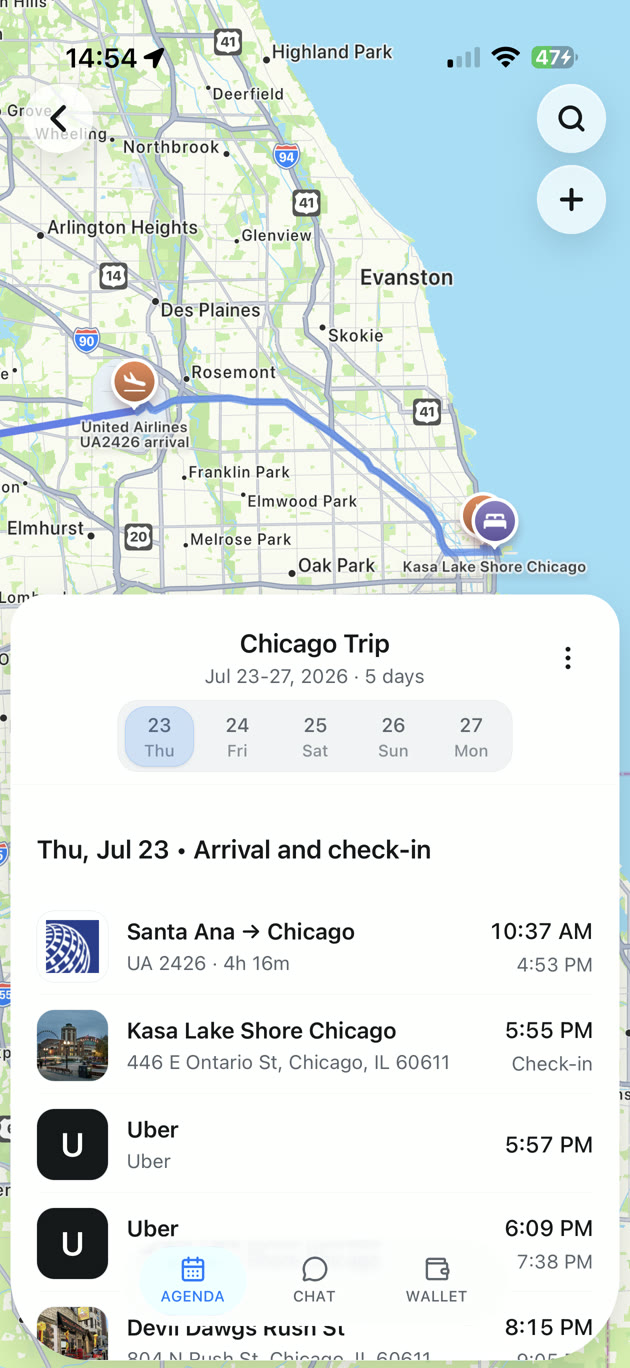
Connect Gmail to organize recognized bookings automatically. Save supported travel links as Ideas, then add the places you choose to your itinerary. You can also create trips and plans by hand, so Gmail is optional.
That is why TripNoted Free is our pick for a vacation that grows around both bookings and inspiration. Tripsy’s Smart Import is a paid feature; TripNoted includes its supported saved-link and Ideas flow on Free. Invite a friend to edit the trip, then carry your saved details on your iPhone.
Free includes:
- One connected Gmail account, with a six-month initial import and scheduled refresh about once an hour.
- Saved travel links and Ideas, plus manual trips and plans.
- Invitations with view or edit permission.
- Saved trip details and supported offline edits on iPhone.
- Five Trip Assistant questions per trip.
- Access on iPhone and the web. The web version needs internet.
You can start with the free plan and build a useful trip before considering an upgrade. See the Free plan details or compare TripNoted and Tripsy.
Common questions
TripIt vs Tripsy questions
Is Tripsy free?
Yes. You can create trips, add activities, sync across devices, and invite guests on Free. Tripsy’s sharing guide lists 10 introductory email forwards for new users. Ongoing reservation forwarding, document storage, expense management, flight alerts, and Smart Import require Pro.
Can Tripsy replace TripIt on Android?
You can view Tripsy itineraries in a browser on Android, but there is no native Android app yet. Create and edit trips in Tripsy’s Apple apps. TripIt has a native Android app and browser editing.
Do TripIt and Tripsy both have flight alerts?
Yes, on their paid Pro plans. Tripsy focuses on flight-change notifications. TripIt Pro also includes tools such as alternate-flight help, seat and fare tracking, and airport navigation.
Can my friends help edit the itinerary?
Yes. TripIt supports view or edit invitations. Tripsy supports collaborator and view-only roles, with additional controls for document and expense access. TripNoted Free includes view or edit invitations too.
What is a free alternative to TripIt and Tripsy?
TripNoted Free is a good fit when you want bookings and saved travel Ideas together, with shared editing and supported offline work on iPhone. It also has a web version. It does not have a native Android app or replace the Pro flight-alert tools.
Make room for the trip you want
Start with TripNoted Free.
Bring in your bookings. Save the places that caught your eye. Invite a friend to help make the plans. Your next trip can come together in one place.